iPhone vs Android Camera: Which Is Better for Photography in 2026? If you are buying a new phone mainly for photography, one question probably comes up sooner or later: iPhone vs Android camera — which one is actually better?
The answer is not as simple as “iPhone is better” or “Android is better.” Both platforms now have excellent camera phones, but they take different approaches to photography.
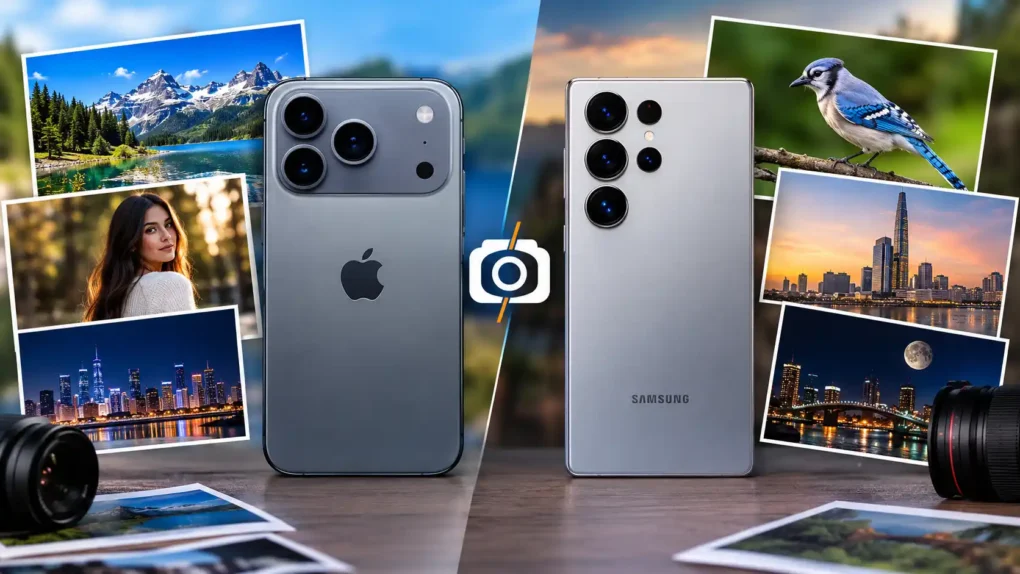
In 2026, flagship phones such as the iPhone 17 Pro and Samsung Galaxy S26 Ultra offer professional-level features that were once associated with dedicated cameras. The iPhone focuses heavily on consistent image processing, video recording, natural-looking results and professional video formats, while Samsung offers extremely high-resolution photography, versatile zoom and extensive camera controls.
So, which one should you choose?
For simple, consistent photography and professional video, iPhone is an excellent choice. For long-range zoom, flexibility and extensive camera hardware, a high-end Android phone such as the Galaxy S26 Ultra can be the better option.
Let’s compare them in detail.
iPhone vs Android Camera: Quick Comparison
| Camera Feature | iPhone 17 Pro | Samsung Galaxy S26 Ultra |
|---|---|---|
| Main camera | 48MP Fusion | 200MP Wide |
| Ultra-wide | 48MP | 50MP |
| Telephoto | 48MP | 50MP + 10MP telephoto |
| Optical-quality zoom | Up to 8x | Up to 10x |
| Maximum digital/processed zoom | Up to 40x | Up to 100x |
| RAW photography | ProRAW | RAW support |
| Night photography | Excellent | Excellent |
| Portrait photography | Excellent | Excellent |
| Video | Excellent | Excellent |
| Professional video | ProRes, ProRes RAW, Log 2 | Advanced Pro video features |
| Manual controls | Good, especially with pro apps | Extensive |
| Best for | Consistency and video | Zoom and versatility |
The specifications above are based on the manufacturers’ current information for these flagship models.
iPhone vs Android Camera: Which Takes Better Photos?
The biggest mistake people make when comparing smartphone cameras is looking only at megapixels.
A camera’s real-world performance depends on much more than resolution. Sensor size, lens quality, stabilization, autofocus, image processing, dynamic range and the camera software all affect the final photograph.
The iPhone 17 Pro, for example, uses three 48MP Fusion cameras and supports high-resolution photography, ProRAW, macro photography, Night mode and advanced computational photography.
The Galaxy S26 Ultra takes a different approach. It combines a 200MP main camera with a 50MP ultra-wide camera and multiple telephoto cameras, giving photographers more flexibility across different focal lengths.
The winner depends on your photography style.
If you want to point the phone at a subject and consistently get a good photo without adjusting many settings, the iPhone is an excellent choice.
If you enjoy experimenting with zoom, different lenses, high-resolution images and manual controls, a flagship Android phone can be more flexible.
iPhone vs Android for Professional Photography
Can a smartphone really be used for professional photography?
Yes — but with an important qualification.
A smartphone is not automatically a replacement for a professional mirrorless or DSLR camera. Dedicated cameras still provide advantages such as larger sensors, interchangeable lenses and greater control over depth of field.
However, modern flagship smartphones can produce extremely high-quality images for:
- Social media
- Product photography
- Travel photography
- Real-estate content
- Portraits
- YouTube thumbnails
- Blog images
- Short-form video
- Online businesses
- Journalism
- Everyday commercial content
For many creators, the biggest advantage is convenience. Your smartphone is always with you.
iPhone 17 Pro Camera: What Makes It Good?
The iPhone 17 Pro has a 48MP Pro Fusion camera system consisting of three 48MP rear cameras.
The main camera has a 24mm equivalent focal length and an f/1.78 aperture. The ultra-wide camera provides a 120-degree field of view, while the telephoto camera provides 4x optical zoom at 100mm and an optical-quality 8x option at 200mm.
It also supports:
- 48MP photos
- 48MP macro photography
- ProRAW
- Night mode
- Photographic Styles
- Portrait photography
- Optical image stabilization
- 4K Dolby Vision video
- ProRes
- ProRes RAW
- Log 2
- Advanced video stabilization
Apple has also added an 18MP Center Stage front camera with features designed for both photography and video.
Why photographers may prefer the iPhone
The iPhone’s biggest strength is not simply the number of megapixels.
It is the combination of hardware, image processing and video capabilities.
You can take a photo quickly, and the phone does much of the complicated processing automatically.
That makes the iPhone particularly attractive to people who want consistent results without spending a lot of time adjusting camera settings.
Samsung Galaxy S26 Ultra Camera: What Makes It Good?
Samsung takes a different approach with the Galaxy S26 Ultra.
Its camera system includes:
- 200MP main camera
- 50MP ultra-wide camera
- 50MP telephoto camera
- 10MP telephoto camera
- 3x optical zoom
- 5x optical zoom
- Up to 10x optical-quality zoom
- Up to 100x Space Zoom
Samsung also uses its ProVisual Engine and Nightography technology to improve image and video processing, particularly in difficult lighting conditions.
The main 200MP camera uses an f/1.4 aperture, while the 50MP telephoto camera uses an f/2.9 aperture. Samsung says the wider apertures help the cameras capture more light, particularly in low-light conditions.
Why photographers may prefer Samsung
The biggest advantage is versatility.
You get multiple cameras and focal lengths, including dedicated telephoto cameras.
That makes the Galaxy S26 Ultra particularly attractive for:
- Wildlife photography
- Sports
- Travel
- Architecture
- Concerts
- Distant subjects
- Landscape photography
- Street photography
If you frequently use zoom, Android’s flagship camera hardware can be extremely useful.
iPhone vs Android Camera for Portrait Photography
Portrait photography is one area where both platforms perform extremely well.
The iPhone offers Portrait mode, Focus and Depth Control, Portrait Lighting and advanced computational photography. The iPhone 17 Pro’s telephoto system also gives photographers useful focal lengths for portraits.
Samsung also offers portrait-focused computational photography and multiple lenses that provide different perspectives.
Which is better?
For natural-looking portraits and simple operation, iPhone is an excellent choice.
For photographers who want to experiment with focal lengths and zoom, Samsung’s camera system provides more flexibility.
The difference is often less about the phone and more about the photographer’s technique.
iPhone vs Android for Low-Light Photography
Low-light photography has improved dramatically on both platforms.
The iPhone 17 Pro includes Night mode, advanced image processing and stabilization designed to preserve detail in challenging lighting conditions.
Samsung’s Galaxy S26 Ultra uses wider apertures and its Nightography system to improve low-light photos and videos. Samsung specifically highlights noise reduction and improved brightness in night video.
Which should you choose?
There is no universal winner for every night scene.
If you want a dependable automatic experience, the iPhone is excellent.
If you want more control over how you capture distant or difficult subjects, Samsung’s additional cameras and zoom system can be a major advantage.
iPhone vs Android Camera for Zoom
This is where Samsung has a particularly strong advantage.
The Galaxy S26 Ultra includes dedicated 3x and 5x telephoto cameras and supports up to 10x optical-quality zoom, with Space Zoom reaching up to 100x.
The iPhone 17 Pro offers a 4x telephoto camera and an optical-quality 8x option at 200mm, with digital zoom up to 40x for photos.
Winner for zoom: Samsung
If zoom photography is important to you, the Galaxy S26 Ultra is the more versatile choice.
It is particularly useful when photographing:
- Animals
- Birds
- Sports
- Buildings
- Moon and distant subjects
- Concerts
- Travel scenes
However, very high digital zoom should not be confused with true optical zoom. At extreme magnifications, computational processing becomes increasingly important.
iPhone vs Android for Video Recording
For serious video creators, the comparison becomes more interesting.
The iPhone 17 Pro supports 4K Dolby Vision recording, ProRes, ProRes RAW and Log 2, along with advanced stabilization and professional audio features. Apple also highlights support for genlock and professional workflows for advanced video production.
Samsung’s Galaxy S26 Ultra also provides advanced video capabilities, including 8K recording and enhanced low-light video processing.
Winner for professional video: iPhone
For creators who edit video seriously, especially those working with professional editing workflows, the iPhone 17 Pro has a very strong advantage.
It is particularly attractive for:
- YouTubers
- Videographers
- Filmmakers
- Social-media creators
- Freelancers
- Content creators
iPhone vs Android for RAW Photography
RAW photography is important when you want maximum control during editing.
Instead of allowing the phone to make all the decisions for you, RAW files preserve more image information for post-processing.
The iPhone 17 Pro supports Apple ProRAW and can capture images in DNG format.
Samsung’s flagship phones also provide RAW-oriented shooting options and extensive camera controls.
Which is better for editing?
Both can work well.
However, photographers who already use software such as Lightroom or other professional editing tools should compare the RAW workflow they prefer before buying.
iPhone vs Android Camera: Manual Controls
This is an area where Android has traditionally been attractive to enthusiasts.
Samsung provides extensive camera controls through its camera ecosystem, giving experienced photographers more ways to control the shooting process.
The iPhone’s standard Camera app is designed more around simplicity, although professional camera apps can unlock significantly more control and the iPhone’s Pro models support professional formats such as ProRAW and ProRes.
Best for manual photography
Android has an advantage for photographers who enjoy controlling settings.
Best for simplicity
iPhone has an advantage for people who want excellent results with minimal effort.
iPhone vs Android Camera: Which Is Better for Social Media?
For Instagram, TikTok, YouTube Shorts, Facebook and other social platforms, both can produce excellent content.
The more important factors are:
- Lighting
- Composition
- Camera technique
- Editing
- Stabilization
- Audio
- Storytelling
A $1,500 phone cannot compensate for poor lighting or bad composition.
For creators who produce lots of video, however, the iPhone’s professional video features can make it particularly attractive. Apple supports formats including ProRes and ProRes RAW on the iPhone 17 Pro.
iPhone vs Android Camera: Which Has Better AI Photography?
Modern smartphones rely heavily on computational photography and AI-assisted processing.
Instead of simply recording what the camera sensor sees, the phone processes the image to improve exposure, color, detail, noise and dynamic range.
Samsung emphasizes AI-powered image processing and zoom capabilities on the Galaxy S26 Ultra.
Apple also uses machine learning throughout its image-processing pipeline, including features such as Photonic Engine and advanced Photographic Styles.
The important point is that AI photography is now part of the camera system on both platforms.
The real difference is how each manufacturer applies it.
iPhone vs Android Camera: Which Is Better for Beginners?
If you are not a photography expert, don’t choose a phone simply because it has the largest megapixel number.
A beginner should look for:
- Good automatic exposure
- Reliable autofocus
- Strong image stabilization
- Good low-light performance
- Useful portrait mode
- Good video quality
- Easy editing
- Reliable camera software
For beginners who want a simple point-and-shoot experience, iPhone is an excellent choice.
For beginners who want to learn photography and experiment with zoom and camera settings, a flagship Android phone such as the Galaxy S26 Ultra can be more exciting.
iPhone vs Android Camera for Professional Photographers
Professional photographers should think beyond the phone brand.
Ask yourself:
What type of photography do I actually do?
Choose iPhone if you primarily shoot:
- Portraits
- Travel
- Social media
- Professional video
- YouTube content
- Interviews
- Short films
- Everyday photography
- Quick commercial content
Choose Android if you primarily shoot:
- Wildlife
- Sports
- Distant subjects
- Architecture
- Travel
- Landscapes
- Zoom-heavy photography
- Experimental photography
- Manual-camera photography
Of course, these categories overlap. Either platform can handle most types of photography.
iPhone vs Android Camera: Which Is Better in 2026?
If we compare current flagship examples, there is no single winner in every category.
iPhone 17 Pro wins or leads in:
- Professional video
- Pro video formats
- Consistent point-and-shoot photography
- Video workflow
- Natural, predictable results
- Professional creator workflows
Galaxy S26 Ultra wins or leads in:
- Zoom flexibility
- High-resolution photography
- Multiple telephoto options
- Long-distance photography
- Camera hardware versatility
- Extensive shooting options
The Galaxy S26 Ultra’s camera system combines a 200MP main sensor with 50MP ultra-wide and telephoto cameras, while the iPhone 17 Pro uses three 48MP Fusion cameras with advanced photo and video processing.
Is iPhone Camera Better Than Android?
Not necessarily.
If your priority is professional video and consistent photography, an iPhone 17 Pro is one of the strongest choices available.
If your priority is zoom, high-resolution images and camera versatility, the Galaxy S26 Ultra may be the better choice.
The best camera is ultimately the one that fits the way you photograph.
Is Android Camera Better Than iPhone?
Again, not universally.
Some Android phones offer camera hardware that iPhones don’t, particularly when it comes to extreme zoom and multiple telephoto cameras.
But the iPhone remains extremely competitive, especially for video and professional content creation.
This is why comparing “iPhone vs Android” as two single cameras isn’t really fair.
Android includes hundreds of different phones, from inexpensive devices to flagship models. A budget Android phone should not be compared directly with a flagship iPhone.
For a meaningful comparison, compare phones in the same price and performance category.
iPhone vs Android Camera: What Should You Buy?
Here’s my practical recommendation.
Buy an iPhone if:
You want excellent photos without spending much time adjusting settings, and you care strongly about video quality, professional recording formats and a straightforward workflow.
Buy a flagship Android if:
You want maximum camera versatility, powerful zoom, multiple telephoto cameras, high-resolution photography and more freedom to experiment.
Buy neither based only on megapixels.
A 200MP camera does not automatically produce better photographs than a 48MP camera.
Camera quality is a combination of:
Sensor + lens + stabilization + processing + software + photographer.
Frequently Asked Questions
Is iPhone better than Android for photography?
Not in every situation. iPhone is particularly strong for consistent photography and professional video, while flagship Android phones can offer greater zoom and hardware versatility.
Which phone has the best camera in 2026?
There is no single camera that is best for everyone. The iPhone 17 Pro and Samsung Galaxy S26 Ultra are among the strongest flagship options, but the right choice depends on whether you prioritize video, zoom, photography, manual controls or ease of use.
Is iPhone better for professional photography?
The iPhone 17 Pro is an excellent professional content-creation tool. Its ProRAW photography and professional video features, including ProRes RAW and Log 2, make it particularly useful for creators and videographers.
Is Samsung better than iPhone for zoom?
For extreme zoom and camera versatility, the Galaxy S26 Ultra has a clear hardware advantage, with dedicated telephoto cameras and up to 100x Space Zoom.
Does more megapixels mean a better camera?
No. Megapixels are only one part of camera quality. Image processing, sensor size, lenses, stabilization, autofocus and software can have a major impact on the final image.
Which is better for YouTube videos, iPhone or Android?
For creators who want professional video formats and a mature video-production workflow, the iPhone 17 Pro is a particularly strong choice. It supports ProRes, ProRes RAW, Log 2 and advanced video recording features.
Which is better for night photography?
Both current flagship phones perform very well in low light. The iPhone 17 Pro offers Night mode and advanced image processing, while Samsung’s Galaxy S26 Ultra uses its Nightography system, wider apertures and noise-reduction processing.
Should I buy iPhone or Samsung for photography?
Choose the iPhone if video and consistent photography are your priorities. Choose Samsung if zoom, high-resolution photography and camera versatility matter more.
Final Verdict: iPhone vs Android Camera
The iPhone vs Android camera debate doesn’t have one universal winner.
In 2026, both platforms have reached a point where the smartphone camera can be good enough for serious photography, content creation and many professional jobs.
The iPhone 17 Pro is particularly impressive for people who want consistent photos, professional video and a streamlined creative workflow.
The Samsung Galaxy S26 Ultra is a better fit for photographers who want extensive zoom capabilities, multiple telephoto cameras, very high-resolution photography and greater hardware flexibility.
So the simplest answer is:
Best for professional video and easy, consistent results: iPhone.
Best for zoom, flexibility and photography experimentation: Android flagship.
And remember: the best smartphone camera is not necessarily the one with the most megapixels — it’s the one that helps you capture the photos and videos you actually want.