Published: September 2026
Category: Cybersecurity / Network Security
Severity: 🔴 High
MikroTik Router Security: Protect Against Brute-Force Attacks. Organizations using MikroTik routers should take immediate steps to review and secure their internet-facing devices. A heightened cybersecurity risk has been identified involving automated scanning, brute-force attacks, exploitation attempts, and unauthorized access targeting publicly reachable MikroTik routers.
The risk is particularly important for organizations operating routers in government, enterprise, educational, financial, healthcare, and other sensitive environments.
Attackers are actively looking for MikroTik devices whose management interfaces are exposed to the public internet. Devices running outdated RouterOS versions, using weak passwords, retaining default configurations, or exposing unnecessary management services can be especially vulnerable.
What Is the Threat?
Cybercriminals can scan publicly accessible IP addresses to identify MikroTik routers and determine whether services such as Winbox, WebFig, SSH, SNMP, or REST API are accessible.
Once a vulnerable or poorly configured router is identified, attackers may attempt to:
- Guess administrative passwords through automated brute-force attacks
- Identify valid administrative usernames
- Exploit vulnerabilities in outdated RouterOS versions
- Obtain unauthorized administrative access
- Modify firewall and routing configurations
- Create unauthorized accounts
- Install or execute malicious scripts
- Use compromised routers as part of botnets
- Route malicious traffic through compromised devices
- Conduct reconnaissance of internal networks
- Maintain persistent access to the network
Because routers sit at a critical point between an organization’s internal network and the internet, their compromise can have consequences beyond the router itself.
Why Internet-Facing MikroTik Routers Are at Risk
The following conditions can significantly increase exposure:
- Outdated RouterOS firmware
- Factory-default configurations
- Weak or reused administrator passwords
- Publicly accessible Winbox
- Internet-exposed WebFig/HTTP/HTTPS
- Internet-exposed SSH
- Unnecessary REST API access
- Insecure SNMP configuration
- Unknown or unnecessary administrator accounts
- Insufficient firewall restrictions
- Lack of logging and monitoring
A router does not necessarily need to be completely outdated to be at risk. An otherwise updated device can still be exposed if its management services are unnecessarily available from the public internet.
Common Attack Methods
1. Internet-Wide Scanning
Attackers can automatically scan large numbers of public IP addresses looking for exposed MikroTik management services.
Commonly targeted services include:
| Service | Typical Port |
|---|---|
| Winbox | TCP 8291 |
| HTTP | TCP 80 |
| HTTPS | TCP 443 |
| SSH | TCP 22 |
| SNMP | UDP 161/162 |
| REST API | Depends on configuration |
The important point is that attackers do not necessarily need to know an organization’s name or network beforehand. Automated tools can discover exposed devices across the internet.
2. Credential Brute-Force Attacks
Attackers may repeatedly attempt to authenticate using commonly used or previously compromised passwords.
Weak credentials such as:
admin123456passwordmikrotik- Blank/default passwords
should never be used on an internet-facing network device.
Every administrative account should have a strong, unique password.
3. Exploitation of Vulnerable RouterOS Versions
Older or vulnerable RouterOS releases may contain security weaknesses that attackers can attempt to exploit.
Organizations should therefore identify the exact RouterOS version running on every MikroTik device and compare it with the vendor’s currently supported and security-patched releases.
Security teams should verify the applicability of individual vulnerabilities to their specific RouterOS version rather than assuming that every listed vulnerability affects every device.
4. Persistence After Compromise
Obtaining initial access may only be the beginning.
An attacker who successfully compromises a router may attempt to create additional accounts, modify firewall rules, change routing configurations, create scripts or scheduled tasks, or alter DNS and proxy settings.
These changes can allow an attacker to maintain access even after the original vulnerability or password problem has been addressed.
Potential Impact of a Compromised MikroTik Router
A compromised router can create several serious security risks.
Unauthorized Administrative Access
Attackers may gain privileged access to configuration and management functions.
Network Reconnaissance
A compromised router can provide valuable information about internal systems, network routes, services and infrastructure.
Botnet Recruitment
The router may be incorporated into a botnet and used for scanning, proxying, denial-of-service activity or other malicious operations.
Traffic Proxying
Attackers may route malicious traffic through the compromised device, making it more difficult to identify their actual infrastructure.
Credential Compromise
Weak, shared or reused administrative credentials can be compromised through automated attacks.
Network Security Bypass
Unauthorized changes to firewall, NAT or routing rules could weaken existing security controls.
Service Disruption
Incorrect or malicious configuration changes can interrupt internet connectivity and internal network services.
Sensitive Information Exposure
Router configurations can contain information about network topology, addressing, routing and other operational details.
Lateral Movement
A compromised router may provide attackers with a strategic position from which to target other systems connected to the network.
Security Vulnerabilities That Organizations Should Review
Security teams should check whether their deployed RouterOS versions are affected by publicly reported vulnerabilities, including vulnerabilities associated with:
- Legacy RouterOS branches
- REST API endpoints
- Winbox account enumeration
- Memory corruption
- Hotspot-related vulnerabilities
Examples identified in the advisory material include CVE-2026-7668, CVE-2025-10948, CVE-2024-54772, CVE-2022-45315 and CVE-2021-3014.
Important: Organizations should verify the affected versions, technical applicability and available vendor fixes for each CVE against their actual RouterOS deployment before taking remediation decisions.
How to Check Whether Your MikroTik Router May Be Exposed
Administrators should review their MikroTik infrastructure for the following warning signs:
- Repeated failed login attempts
- Login attempts from unfamiliar external IP addresses
- Unexpected successful administrative logins
- Unknown administrator accounts
- Recently created user accounts
- Unexpected firewall-rule changes
- Unexpected NAT configuration changes
- Unauthorized routing changes
- Suspicious RouterOS scripts
- Unexpected scheduled tasks
- Changes to DNS or proxy configuration
- Unusual outbound traffic
- Unexpected SNMP activity
- Public exposure of management interfaces
- Outdated RouterOS versions
Finding one of these indicators does not automatically prove that a router has been compromised, but it should trigger further investigation.
Recommended Security Measures
1. Update RouterOS
Upgrade MikroTik devices to a current vendor-supported and security-patched RouterOS release appropriate for the hardware and deployment.
Do not continue operating vulnerable legacy firmware simply because the router is functioning normally.
For legacy RouterOS v6 devices where continued use is unavoidable and the relevant hardware/software supports it, organizations should apply the appropriate vendor-supported security update and plan migration to a supported release.
2. Use Strong and Unique Passwords
Replace all:
- Default passwords
- Weak passwords
- Shared passwords
- Reused passwords
- Easily guessable passwords
Each administrative account should have a strong and unique credential.
Where supported, organizations should also use stronger authentication and centralized administrative controls appropriate to their environment.
3. Do Not Expose Management Interfaces to Everyone
Management services should not normally be accessible from the entire public internet.
Restrict administrative access to trusted networks, VPNs or specifically authorized IP addresses wherever possible.
Particular attention should be given to:
- Winbox
- WebFig
- SSH
- REST API
- SNMP
A good security principle is:
If a management service does not need to be reachable from the internet, don’t expose it to the internet.
4. Disable Unnecessary Services
Review all enabled MikroTik services and disable services that are not required.
For example, unused legacy management services should not remain enabled simply because they were included in an old configuration.
Reducing the number of exposed services reduces the attack surface.
5. Strengthen Firewall Rules
Apply restrictive input firewall rules to prevent unauthorized access to router management services.
Administrative services should ideally be accessible only from known and trusted management networks.
6. Secure SNMP
If SNMP is not required, consider disabling it.
If SNMP is required:
- Restrict access to authorized monitoring systems
- Replace default community strings
- Avoid publicly exposing SNMP
- Monitor unexpected SNMP requests
Default community strings such as “public” and “private” should not be used as a security measure.
7. Review Router Accounts
Regularly audit all router accounts.
Look for:
- Unknown users
- Former employees’ accounts
- Inactive accounts
- Duplicate accounts
- Unnecessary administrator privileges
Remove accounts that are no longer required.
8. Review Configuration Integrity
Administrators should compare the current configuration against an approved baseline.
Pay particular attention to:
- Firewall rules
- NAT rules
- Routing tables
- DNS settings
- Proxy settings
- User accounts
- RouterOS scripts
- Scheduled tasks
Unexpected changes should be investigated.
Monitoring and Detection
Security does not end after patching the router.
Organizations should continuously monitor their network infrastructure for suspicious activity.
Recommended monitoring includes:
| Monitoring Activity | What to Look For |
|---|---|
| Authentication | Repeated failed logins |
| Administrative access | Unusual source IP addresses |
| User accounts | New or modified accounts |
| Firewall | Unexpected rule changes |
| NAT | Unauthorized configuration changes |
| Routing | Unexpected routes |
| Scripts | Unknown or suspicious scripts |
| Traffic | Unusual outbound traffic |
| Management services | Unexpected internet exposure |
| SNMP | Unauthorized access attempts |
Centralized logging and alerting can significantly improve the ability to detect suspicious activity early.
What to Do If You Suspect a Compromise
If a MikroTik router shows signs of unauthorized access, administrators should treat the situation as a potential security incident.
Recommended steps include:
- Restrict or isolate the affected router where operationally possible.
- Preserve relevant logs and configuration information.
- Review all administrator accounts.
- Change compromised or potentially exposed credentials.
- Review firewall, NAT and routing configurations.
- Check RouterOS scripts and scheduled tasks.
- Investigate unusual outbound traffic.
- Determine whether other systems may have been accessed.
- Update the router to a secure supported release.
- Rebuild or restore the configuration from a known-good baseline where necessary.
- Continue monitoring the device after recovery.
Simply changing the password may not be sufficient if an attacker has already established persistence through another account, script or configuration change.
Security Checklist for MikroTik Administrators
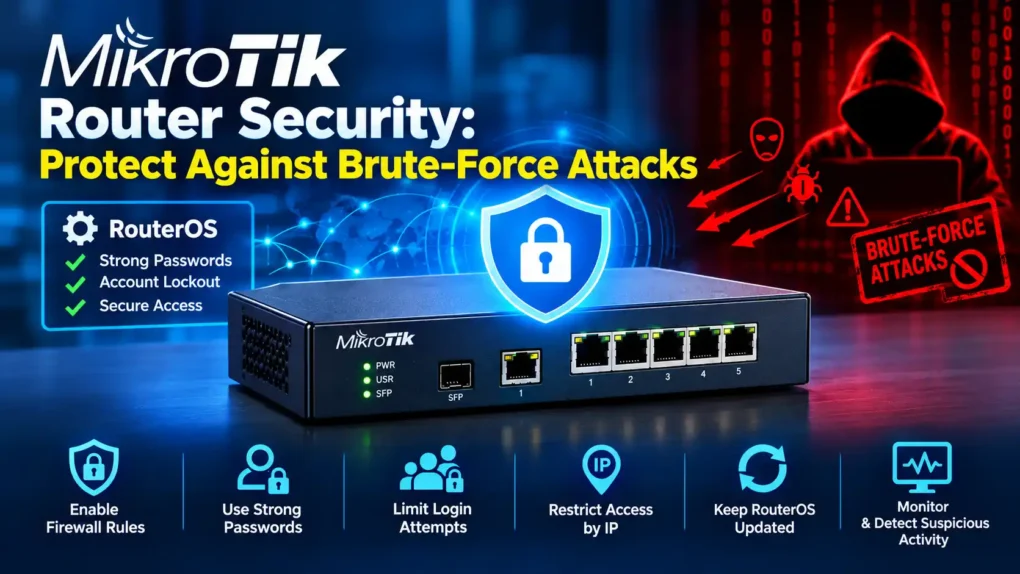
Use the following checklist for every internet-facing MikroTik router:
- RouterOS is updated to a supported security-patched release
- Default credentials have been removed
- Administrator passwords are strong and unique
- Unnecessary administrator accounts have been removed
- Winbox is restricted to trusted networks
- WebFig is restricted to trusted networks
- SSH is restricted to trusted networks
- REST API is disabled or properly restricted where applicable
- Unnecessary services are disabled
- SNMP is disabled if not required
- SNMP community strings are not default
- Firewall input rules restrict management access
- NAT and routing configurations have been reviewed
- RouterOS scripts have been reviewed
- Scheduled tasks have been reviewed
- Authentication logs are monitored
- Configuration changes are monitored
- Unusual outbound traffic is investigated
- A known-good configuration backup is maintained
- An incident-response procedure is available
Final Recommendations
MikroTik routers are an important part of many organizations’ network infrastructure, but they should be treated as critical security devices, not simply as internet connectivity equipment.
The combination of an outdated RouterOS version, weak credentials and publicly accessible management services can create a significant security risk.
Organizations should therefore prioritize:
Patch → Harden → Restrict → Monitor → Respond
Updating RouterOS alone is not enough. Security teams should also reduce internet exposure, strengthen authentication, remove unnecessary services and accounts, review configurations and continuously monitor administrative activity.
For organizations with internet-facing MikroTik infrastructure, now is a good time to perform a complete security review rather than waiting for evidence of compromise.
Disclaimer
This article is intended for cybersecurity awareness and defensive security purposes. Organizations should verify the technical applicability of vulnerabilities and remediation recommendations against their specific MikroTik hardware, RouterOS version, network architecture and vendor documentation before making changes to production systems.
MikroTik Router Security: Protect Against Brute-Force Attacks