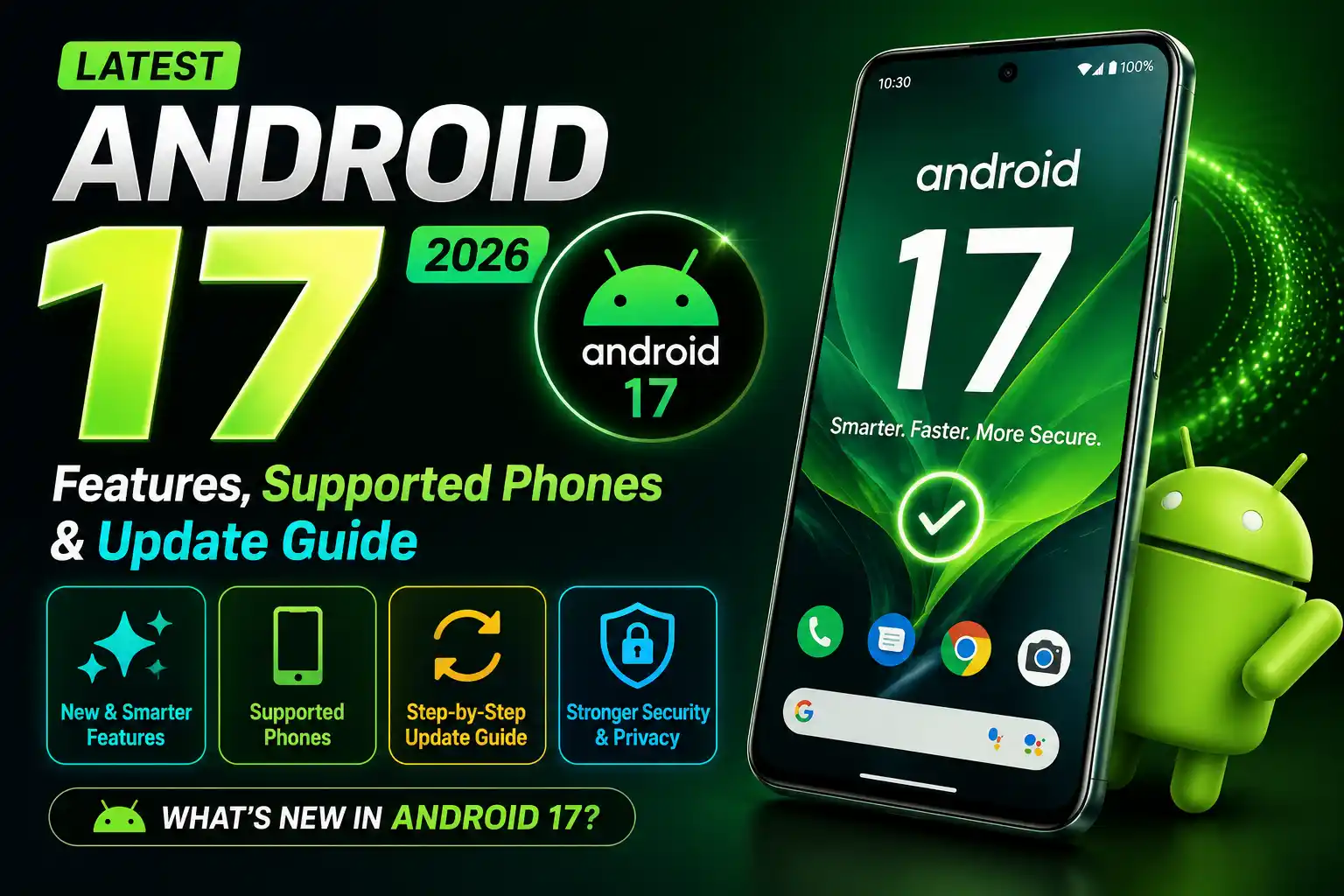
Latest Android Version 2026: Android 17 Features, Supported Phones & Update Guide. This article will lead you to make the best decision and updated knowledge about latest version of Android. If you’ve been Googling “what’s the newest Android update,” here’s the short answer: Android 17 is now the latest stable version of Android, and it’s already rolling out to phones around the world. Google pushed it out to Pixel devices first on June 16, 2026, and Samsung, OnePlus, and other major brands are following with their own updates.
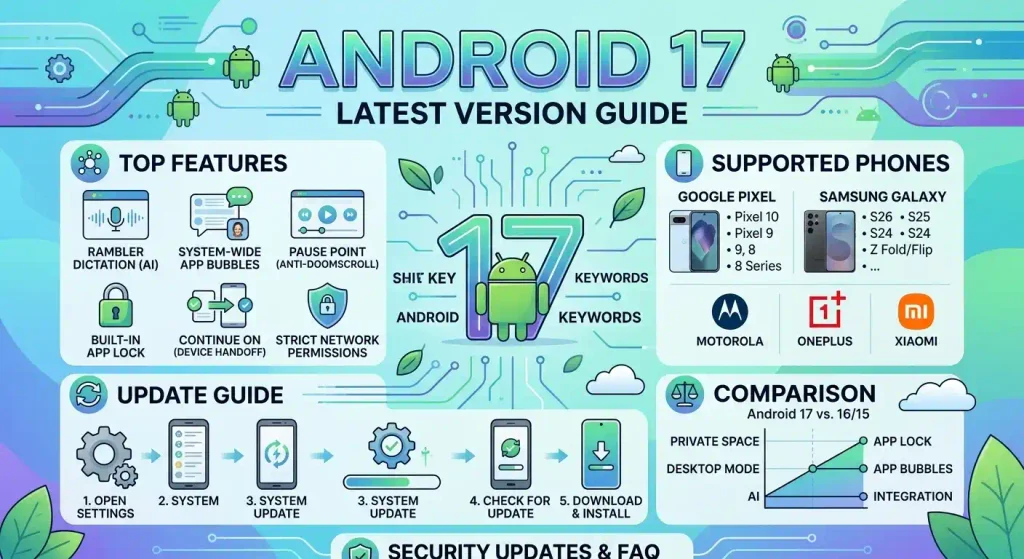
If you’re still running Android 16 or older, don’t worry — this guide walks you through everything that’s changed, whether your phone is eligible, and exactly how to install the update without any guesswork.
What’s the Latest Android Version?
As of now, Android 17 (internally nicknamed “Cinnamon Bun”) is the newest major version of Android. It officially replaced Android 16 as Google’s current release, carrying the API level 37 designation that developers use to target the platform.
Android has moved away from splashy, once-a-year redesigns. Instead, Google now ships one major platform update annually, paired with smaller quarterly refinements (called QPRs) that quietly add features throughout the year. So while Android 17 is the headline release, expect it to keep evolving over the coming months rather than staying frozen at launch.
Android 16 Release
Before jumping into what’s new, it helps to know where Android just came from. Android 16 launched on June 10, 2025, arriving first on supported Pixel phones before spreading to Samsung, OnePlus, and other manufacturers through late 2025. A follow-up update in December 2025 added AI-powered notification summaries, a Notification Organizer, custom icon shapes, and parental controls.
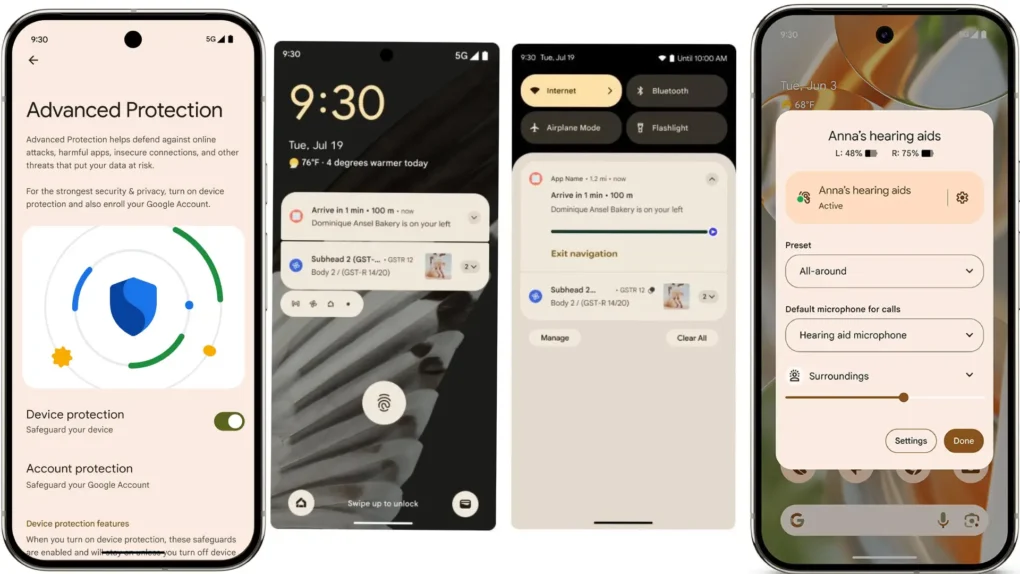
Android 16 focused heavily on visual polish through its Material 3 Expressive design language, along with Live Updates for real-time tracking (think delivery or rideshare status), hearing-aid support, and an Advanced Protection mode for high-risk users. That release cycle officially closed when Google handed the baton to Android 17 in June 2026.
Android 17 Release
Google skipped the traditional Developer Preview stage this cycle, relying instead on its continuous Canary channel for early testing. From there, Android 17 moved through four public betas before going stable:
| Milestone | Date |
|---|---|
| Beta program begins | February 2026 |
| Beta 4 (final beta) | April 16, 2026 |
| Stable release (Pixel) | June 16, 2026 |
| Samsung One UI 9 (Android 17) stable | July 22, 2026 |
| Wider OEM rollout (OnePlus, Oppo, Vivo, Motorola, etc.) | Q3–Q4 2026 |
Google also released the Android 17 source code to the Android Open Source Project (AOSP) on the same day as the stable launch, which is why third-party manufacturers were able to start their own testing almost immediately.
Android 17 Features
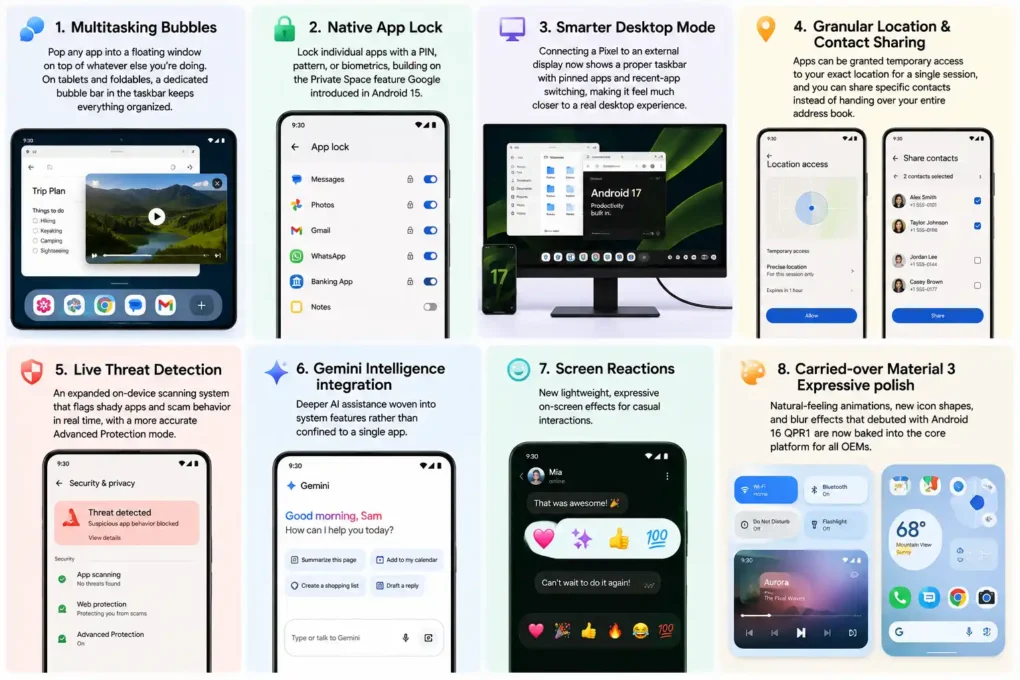
Unlike Android 16’s major visual overhaul, Android 17 leans into refinement, productivity, and privacy rather than a dramatic redesign. Here’s what actually matters for everyday use:
- Multitasking Bubbles — Pop any app into a floating window on top of whatever else you’re doing. On tablets and foldables, a dedicated bubble bar in the taskbar keeps everything organized.
- Native App Lock — Lock individual apps with a PIN, pattern, or biometrics, building on the Private Space feature Google introduced in Android 15.
- Smarter Desktop Mode — Connecting a Pixel to an external display now shows a proper taskbar with pinned apps and recent-app switching, making it feel much closer to a real desktop experience.
- Granular Location & Contact Sharing — Apps can be granted temporary access to your exact location for a single session, and you can share specific contacts instead of handing over your entire address book.
- Live Threat Detection — An expanded on-device scanning system that flags shady apps and scam behavior in real time, with a more accurate Advanced Protection mode.
- Gemini Intelligence integration — Deeper AI assistance woven into system features rather than confined to a single app.
- Screen Reactions — New lightweight, expressive on-screen effects for casual interactions.
- Carried-over Material 3 Expressive polish — Natural-feeling animations, new icon shapes, and blur effects that debuted with Android 16 QPR1 are now baked into the core platform for all OEMs.
Supported Google Pixel Phones
As always, Pixel devices got Android 17 first — and Google’s support list is broad. If you own any of these, you’re eligible for the update:
- Pixel 6, 6 Pro, 6a
- Pixel 7, 7 Pro, 7a
- Pixel Fold, Pixel Tablet
- Pixel 8, 8 Pro, 8a
- Pixel 9, 9 Pro, 9 Pro XL, 9 Pro Fold, 9a
- Pixel 10, 10 Pro, 10 Pro XL, 10 Pro Fold, 10a
If you’re on a Pixel 5 or older, unfortunately that device has aged out and won’t receive Android 17.
Samsung Availability
Samsung’s Android 17 skin is called One UI 9, and its rollout has followed this pattern:
- May 2026 — Open beta launched for the Galaxy S26 series in select regions (US, UK, Germany, South Korea, India, Poland).
- July 22, 2026 — Stable release debuted on the Galaxy Z Fold 8, Z Fold 8 Ultra, and Z Flip 8.
- August–September 2026 — Rollout expanding to the Galaxy S26 series, followed by the S25 and S24 lines and other recent foldables.
- Later in 2026 — Mid-range and older eligible Galaxy devices join the queue.
Samsung now backs recent flagships with up to seven years of major OS updates, though older models like the Galaxy S21 and S22 have already reached the end of their major update cycle and won’t receive Android 17.
How to Check Your Android Version
Not sure what you’re currently running? Here’s the fastest way to check on any Android phone:
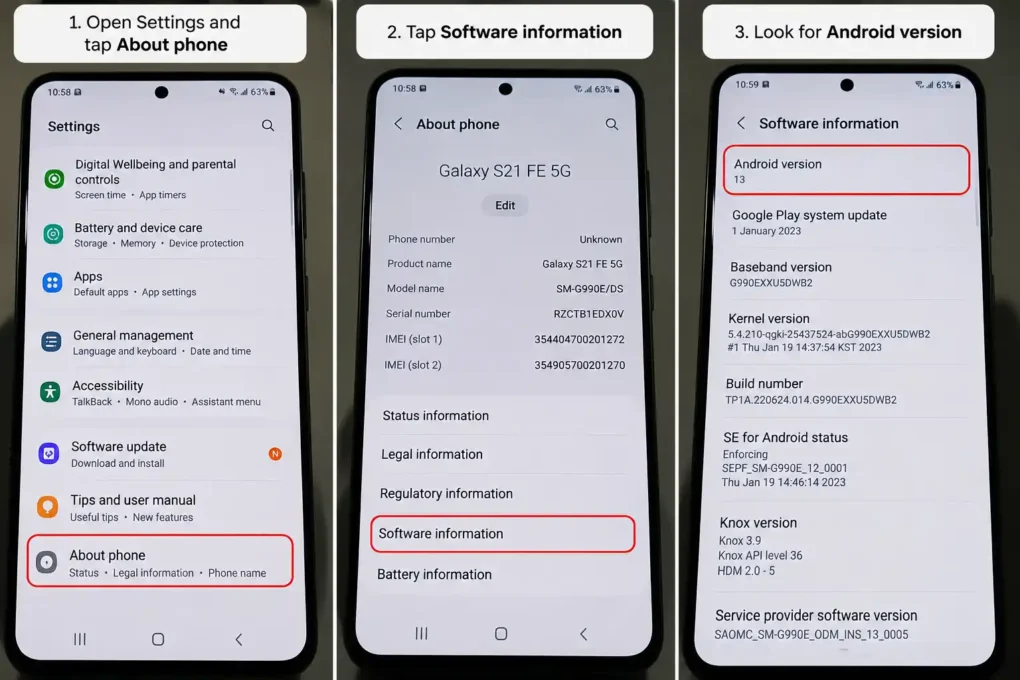
- Open the Settings app.
- Scroll down and tap About phone (on Samsung, this may be labeled About phone under a similar menu).
- Tap Software information.
- Look for Android version — this tells you exactly what’s installed.
How to Update Android
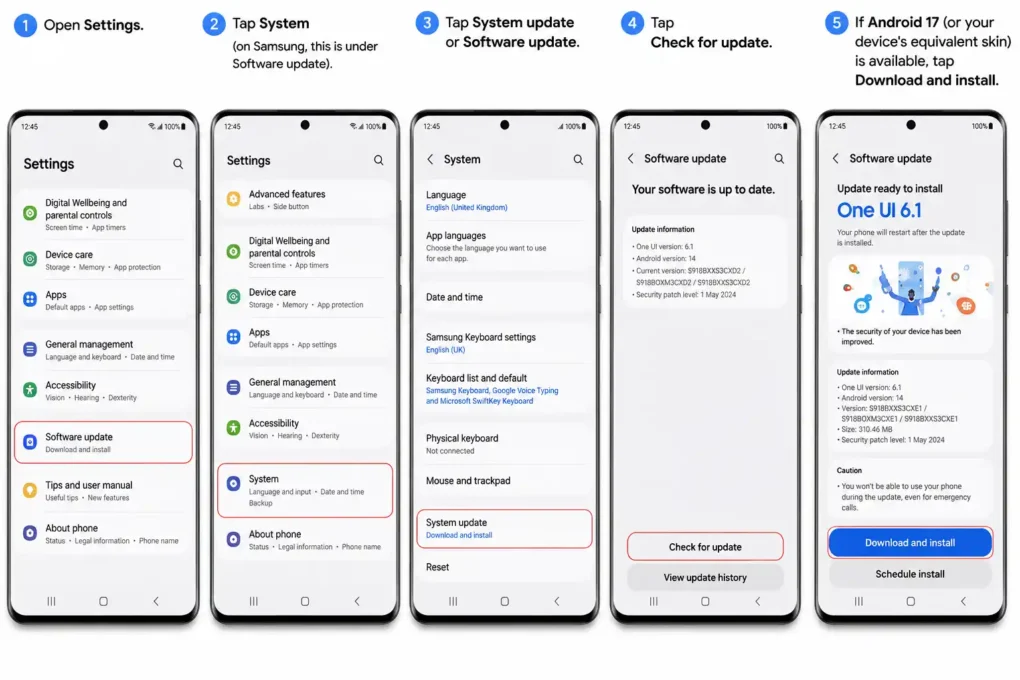
Most Android phones update automatically in the background, but if you’d rather not wait, you can trigger the check manually:
- Open Settings.
- Tap System (on Samsung, this is under Software update).
- Tap System update or Software update.
- Tap Check for update.
- If Android 17 (or your device’s equivalent skin) is available, tap Download and install.
A few tips: connect to Wi-Fi before updating, make sure your battery is above 50% (or plug in), and back up important files first, just in case. Google notes that update rollouts can take up to 24 hours to appear even after you check manually, so don’t panic if it’s not there immediately.
Android 17 vs Android 15
| Feature | Android 15 | Android 17 |
|---|---|---|
| Multitasking | Basic split-screen | Floating multitasking bubbles + bubble bar |
| App privacy | Private Space (hide apps) | Native App Lock + granular location/contact sharing |
| Desktop mode | Limited/basic | Full taskbar with pinned & recent apps |
| Threat detection | Standard Play Protect | Live Threat Detection with real-time scam alerts |
| Design language | Pre-Material 3 Expressive | Full Material 3 Expressive across all OEMs |
| AI integration | Early Gemini features | Deeper, system-wide Gemini Intelligence |
Security Updates
Security is one of the biggest reasons to stay current, regardless of which features excite you. Android 17 tightens things up with:
- Live Threat Detection for real-time, on-device scam and malware flagging.
- Refined Advanced Protection mode, aimed at journalists, activists, and anyone at higher risk of targeted attacks.
- Temporary, session-based location permissions, reducing how much background access apps can quietly accumulate.
- A system-level contacts picker, so apps only see the specific contacts you approve instead of your full list.
Beyond Android 17 itself, Google and Samsung continue issuing monthly security patches for supported devices, independent of major OS updates. Even if your phone isn’t eligible for Android 17, checking for and installing these monthly patches is still one of the simplest ways to stay protected.
FAQs
Is Android 17 the latest Android version? Yes. Android 17 officially became the latest stable release on June 16, 2026, replacing Android 16.
Will my phone get Android 17? Google Pixel 6 and newer are supported. For other brands, check your manufacturer’s official update page — Samsung, OnePlus, Motorola, and others are rolling out their Android 17-based updates through late 2026.
What is Android 17 called on Samsung phones? Samsung’s version of Android 17 is branded One UI 9.
Do I need to back up my phone before updating? It’s strongly recommended. While OS updates rarely cause data loss, backing up photos, contacts, and app data first protects you against the rare failed update.
Is Android 17 a big redesign like Android 16? No. Android 16 introduced the major Material 3 Expressive visual overhaul. Android 17 focuses more on productivity, privacy, and under-the-hood refinements rather than a dramatic new look.
How often does Android get a major update? Google now ships one major Android version per year, with smaller quarterly (QPR) updates in between that add incremental features and fixes.
Last updated: August 2026. Rollout timelines vary by carrier and region — check your device’s Settings app for the most accurate availability.